Security for native products
What are CSP headers?
A CSP (Content Security Policy) header is a list of semicolon-separated rules that define where and how resources, such as JavaScript, images, fonts, and stylesheets, can be loaded. CSP rules are designed to prevent Cross-Site Scripting (XSS) and code injection attacks.
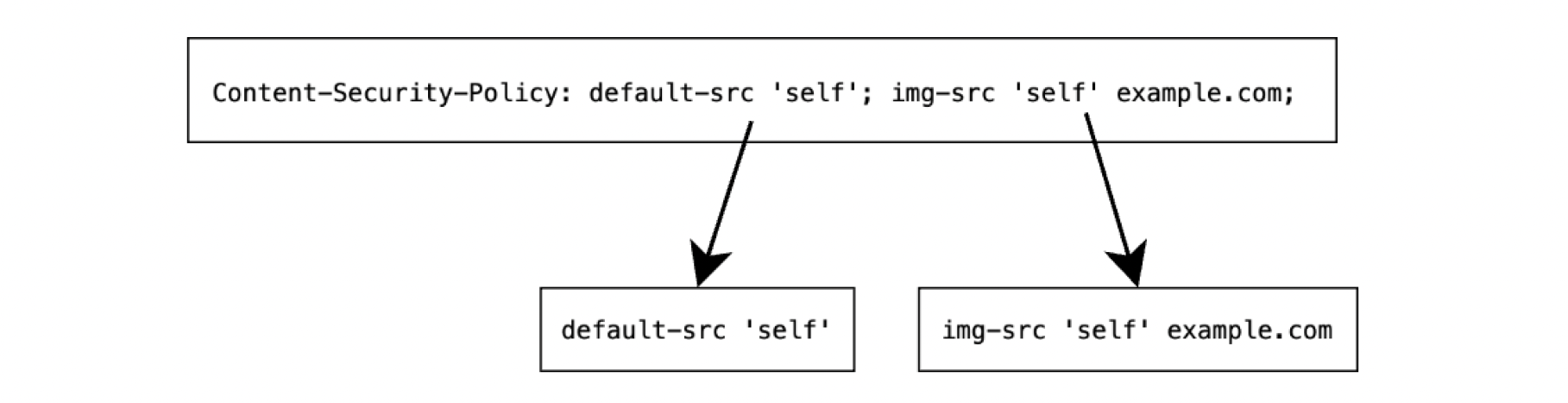
Understanding Number Used Once (nonce's)
If CSP headers define where a resource can be loaded from, a nonce validates scripts that are executed inline. The nonce is part of the CSP header and blocks all inline scripts that don't include the correct nonce.
CSP headers & Open applications
WPP Open currently supports multiple types of applications. However, this guide focuses only on native applications (please refer to the FAQ to determine your application's type). There are currently over 500 applications (approximately 150 actively used). These applications are typically loaded through a bundle file served from external resources, along with other static assets from different locations. If we were to roll out minimally permissive CSP headers with these requirements, we would either exceed the 8 KB limit applied to HTTP headers or have to use catch-all wildcards. The latter approach would not align with our goal of maintaining minimal permissions.
Solution
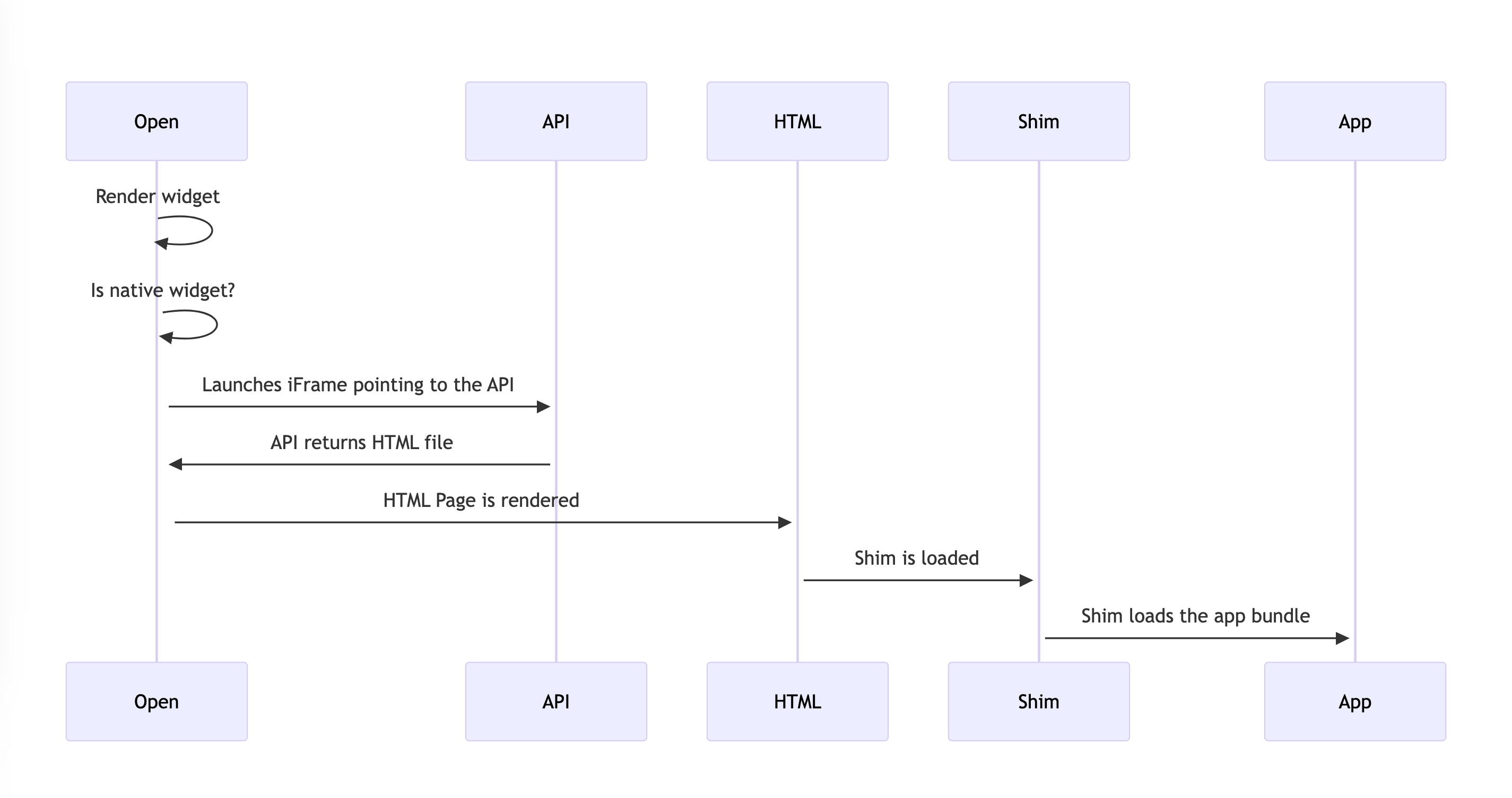
Our solution is to wrap native applications in an iFrame, providing a JS shim that replicates the native application API and maps interactions between the shim and the native application.
This approach offers several benefits:
- The iFrame approach is already supported, and a specific type will be introduced for this implementation.
- Resources within an iFrame are isolated from the parent’s CSP headers, ensuring stricter security boundaries.
- It separates concerns between the Core WPP Open platform and third-party applications, maintaining a cleaner architecture.
New HTML page
Using an iFrame means we need a new HTML page generated to load the JS shim and your native application. We have created a service which serves this HTML file from different domains for each application. These domains will follow the following format:
[APP_UUID].apps.os.wpp.com, where [APP_UUID] is the unique identifier of your application.
Hosting each application on a unique domain prevents cookie sniffing, and ensures that cookies from one application cannot be accessed by another. This helps protect against unauthorized use of your cookies.
JS shim
The HTML file loads a JS shim, a piece of JavaScript that maps the APIs between the iFrame and the native application. This ensures that the application functions as expected. The shim is still under active development, but we believe it covers all documented API functions.
API compatibility
High-level
| Feature | Support | Notes |
|---|---|---|
| Context Object | ✅ | Full context object is passed in |
| Theming (including fonts) | ✅ | Font is part of the theme that is passed to the iFrame |
| Deep Linking | ✅ | The current iFrame pathname is synced with the parent window, ensuring the same behavior as before. You should notice no differences in URL manipulation. |
| History Manipulation | ✅ | You can use the browser's back and forward buttons to navigate |
| OsContext API | ✅ | No breaking changes. API stays the same |
| Library Types Support | ✅ | We are supporting System.js and ESM modules |
| 3rd Party Apps Cross-Communication | ⚠ | Currently not supported, but can be added upon request. |
| Local Storage & Cookies | ⚠ | May face restrictions due to iFrame sandboxing |
| Performance Impact | ⚠ | Applications may experience slightly longer load times due to an additional network request during startup. |
Low-level
| Feature | Support |
|---|---|
| navigation.openMenu | ✅ |
| navigation.openApp | ✅ |
| navigation.openCompactApp | ✅ |
| navigation.triggerError | ✅ |
| analytics.track | ✅ |
| analytics.trackExternalLinkLaunch | ✅ |
| osContext.subscribe | ✅ |
| domElementGetter | ✅ |
| osAPI | ✅ |
Known changes
While we are still performing extensive testing of our solution, please check the FAQ below for updates.
While we are striving for 100% API compatibility, there are some areas where you may encounter problems with your application.
Cookies
If you are setting a cookie, it must be set to SameSite=None; Secure due to Chrome's default security policy, which defaults cookies to SameSite=Lax.
CORS headers
Cross-origin request headers, if implemented, must be updated to *.wpp.com.
Workflow
The diagram below outlines the flow from WPP Open to the API, HTML, and Shim.
Rollout & timeline
The rollout of the CSP headers approach is planned for a 4-week testing period.

Major dates
| Date | Milestone | Notes |
|---|---|---|
| 2025/02/15 | Communication | |
| 2025/02/28 | Development documentation updated | TBC |
| 2025/03/01 - 2025/03/31 | Testing period using cookie | TBC |
| 2025/04/01 | Go live | TBC |
| 2025/04/01 - 2025/04/30 | Hypercare | TBC |
Testing
The release is planned under a cookie-based feature flag and/or a specific tenant. This approach allows production applications to be tested with the new solution.
On the page with an open application, run the following commands in the console: window.enableRenderAppInIframe() and window.disableRenderAppInIframe(). These commands allow testing how the application behaves when rendered inside an iframe.
Using CSS variables with --wpp-os-header-height
If your application relies on the --wpp-os-header-height CSS variable for layout calculations, you may have to modify its usage for proper rendering.
For example, height: calc(100vh - var(--wpp-os-header-height)) can be changed to height: calc(100vh).
Setting --wpp-os-header-height to 0 has not consistently worked across all applications.
Reporting Issues
If you encounter a problem, follow these steps to create a ticket:
- Write an email to
[email protected]. - Include the following details:
- Application name
- Environment you are testing in (should be
live) - URL of the page where you encountered the error
- Screenshot of the error in the console
- Send the email.
- You should receive an automatic response confirming the submission and outlining the same steps as above.
We will review emails daily, create tickets, and prioritize issues accordingly.
Hypercare
Hypercare is similar to testing in support. Any issues that arise will be addressed promptly using the same process as above.
FAQ
How do I know what type of application I have?
Navigate to DevHub within WPP Open and open your application. Underneath the title of the application, you will see a small icon identifying the type of application you have:

Will I have to do any development?
The solution was chosen because it would require minimal work by application developers. We support all current Native Application APIs, so there should be minimal development needed.
However, if your application is doing something that isn't documented above, please verify that it will still work.
Will native applications still be supported?
There are no current plans to stop supporting native applications.
How long will native applications be supported?
There is no timeframe for when, or if, native applications will be sunset.
Why can't my application be added to the CSP headers?
We are dealing with hundreds of applications spread over thousands of domains. Listing all application domains in the CSP header is not feasible due to:
- The 8 KB HTML header limit would be exceeded.
- Managing a large list of headers would be problematic, and any automatic attempt to handle them may introduce security risks.
Will this increase load time for native applications?
Yes, there will be a slight increase due to the additional hop and extra JS file being loaded.
I use cookies for authentication.
Please ensure your cookies are set to sameSite=none.
I am concerned about using secureSite=None in my cookies.
SameSite=None itself is not inherently a security risk, but using it without the "Secure" attribute can be a vulnerability.
It allows cross-site cookies to be sent over insecure connections, potentially exposing sensitive user data.
Therefore, always use "SameSite=None; Secure" when necessary to mitigate this risk.
How does theming work?
The system takes the JSON theme and automatically converts it into CSS variables at the document body level of the HTML frame.
The theme is then passed via the OSContext object, ensuring backward compatibility.
How it works:
- The theme JSON is fetched from the API.
- It is resolved into CSS variables on the
<body>. - All components, including those inside iFrame, inherit and apply styles dynamically.
Example JSON:
{
"content": {
  "Light": {
    "color": {
      "primary": { "500": "#5E0E85" }
     }
   }
 }
}
Example resolved CSS:
body {
--wp-color-primary-500: #5E0E85;
}
No manual styling is needed—components inside the iFrame automatically apply styles based on the theme.
How is testing being done?
Please refer to the testing instructions in the document above.
Who writes the Shim?
The Shim has already been written and deployed to the environment.
As a developer, you do not need to write the shim.
Where is the HTML page hosted?
The HTML page will be hosted on its own subdomain, following this format:
[APP_UUID].apps.os.wpp.com
This domain is not tenant-aware.
Do I still need to implement a nonce?
Implementing a nonce and a CSP header in the HTML page is a best practice, but it is out of scope for this release.
Towards the end of this process, further communication will provide details on how to control your own CSP headers and implement nonces within this application.
Do I need to change any DevHub configuration?
No changes to DevHub configuration are required.