Relations in Apigee
Once you've constructed an API, the next step is to make it accessible to both internal and external developers. This chapter provides a concise overview of the necessary steps to achieve this goal.
Understanding relations between APIs and specifications
We use the OpenAPI Specification (OAS) to document our REST APIs. It's important to note that specification is an entity in itself and has a unique role in our process.
In terms of the relationship between a specification and an API, Apigee Edge offers the option to generate APIs based on the specification. This generation process creates conditional flows for each of the paths outlined in the specification. It's worth emphasizing that while a specification can be used to generate an API, it doesn't necessarily mean there's a one-to-one relation between a specification and an API. The connection is optional and flexible.
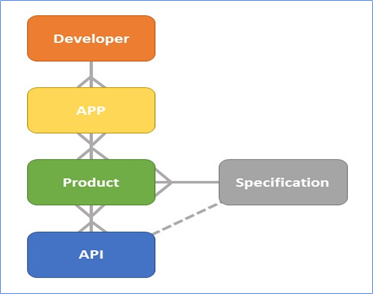
Creating specifications for multiple APIs
When integrating your API into the developer portal, it's important to note that you don't expose the API directly; instead, it is presented as a product. A product can include multiple APIs. By default, we establish a one-to-one relationship between products and APIs unless there's a specific reason to do otherwise.
When you publish a product, you include a specification snapshot that becomes visible in the portal. If a product comprises multiple APIs, it's essential to create a specification that covers all these APIs to ensure that all their methods are accessible in the portal. This can be achieved by defining the base path as either "/v1" or "/".
While a specification is typically associated with a single product, it's also possible to create multiple products using the same specification. This is useful when you need two products that incorporate the same APIs but have distinct custom attributes, quotas, or environment access settings. For more detailed information on specifications, please refer to our documentation on Swagger - Specification.
Be sure to clarify in the specification description which API it is intended for, like Specification for API name and you can achieve this by including a description property within the info element.
What are API products
A product is typically designed for a set of APIs that share common features or are logically connected. For example,
we can create a product that encompasses all APIs related to managing labels, like creating, deleting, or updating
labels. This approach simplifies granting applications access to a collection of related APIs. Products can also
cater to specific needs of a particular developer or application.
Sometimes, you may create a product that includes only a single API. When you publish a single API on the developer portal, you have the option to create a product exclusively for that API.
Registering as a developer
To register a developer, you need their name and email address. Developers can sign up on their own through the developer portal, or they can be added manually using the Edge management user interface.
Registering application in developer portal
A developer can register an application via the developer portal. Each application is linked to a single developer but may be associated with multiple products. Depending on the product settings, an application can either gain automatic access or request access to one or more products. Once an application is created, it receives an API key, and you can generate multiple API keys for the same application. These API keys can also be deleted or revoked. Developers have the option to create multiple developer apps.
The API key is shared within the developer portal. When a developer creates an app and selects a product to integrate into their app, the API key (also known as the 'consumer key' or 'key') and its associated secret will be visible in the application's overview.
Test Application
In the DEV environment, we consistently set up a single test application that enjoys access to all APIs. This application serves as a testing tool for API developers. Within the API team, we refer to this as "AT-TEST" (WPP-TEST).