Introduction
This document describes WPP-specific choices on architecture and common practices that should be applied to build a strong and secure API: The API Conventions.
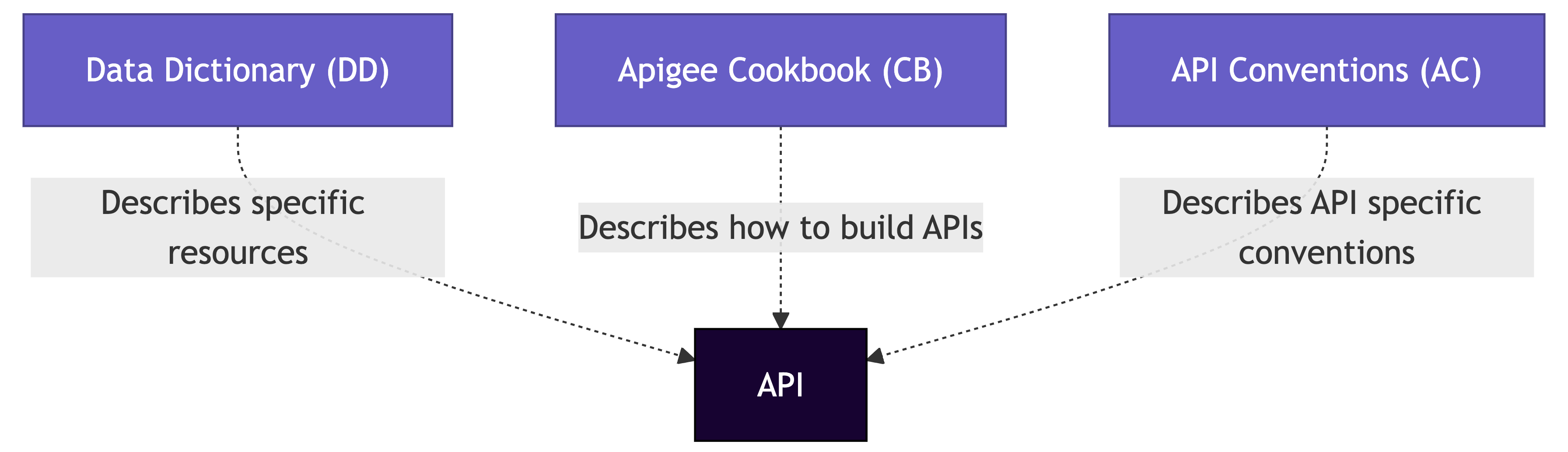
Figure 1. Positioning documents and guidelines
Positioning documents and guidelines
As shown in the diagram above, two documents that set requirements for your API:
- The Data Dictionary (DD): Specifies the resources used in WPP, defining the path of your API.
- The Cookbook (CB): Describes how to build an API following the standards set by the Integration Design Authority.
API conventions cover naming conventions, error handling, testing, security, and more. These conventions are based on REST (Representational State Transfer) principles.
- Resources expose entities through URIs. They represent objects such as
books,addresses, ororders. - Representations use JSON to represent data objects and attributes.
- Messages explicitly use HTTP methods such as
GET,POST,PUT,PATCH, andDELETE. - Stateless interactions do not store client context on the server between requests, ensuring scalability by eliminating state dependencies.
API in context
An API (Application Programming Interface) exposes a backend (web) service or system to a consumer. As illustrated in Figure 2, APIs allow for:
- Defining which parts of a system are exposed and to whom.
- Adding an extra layer of security.
- Creating mashups that combine information from different sources into a single new endpoint.
- Performing content type transformations.
- Enabling API management features such as analytics.
- Keeping business logic out of APIs by implementing it in the backend.
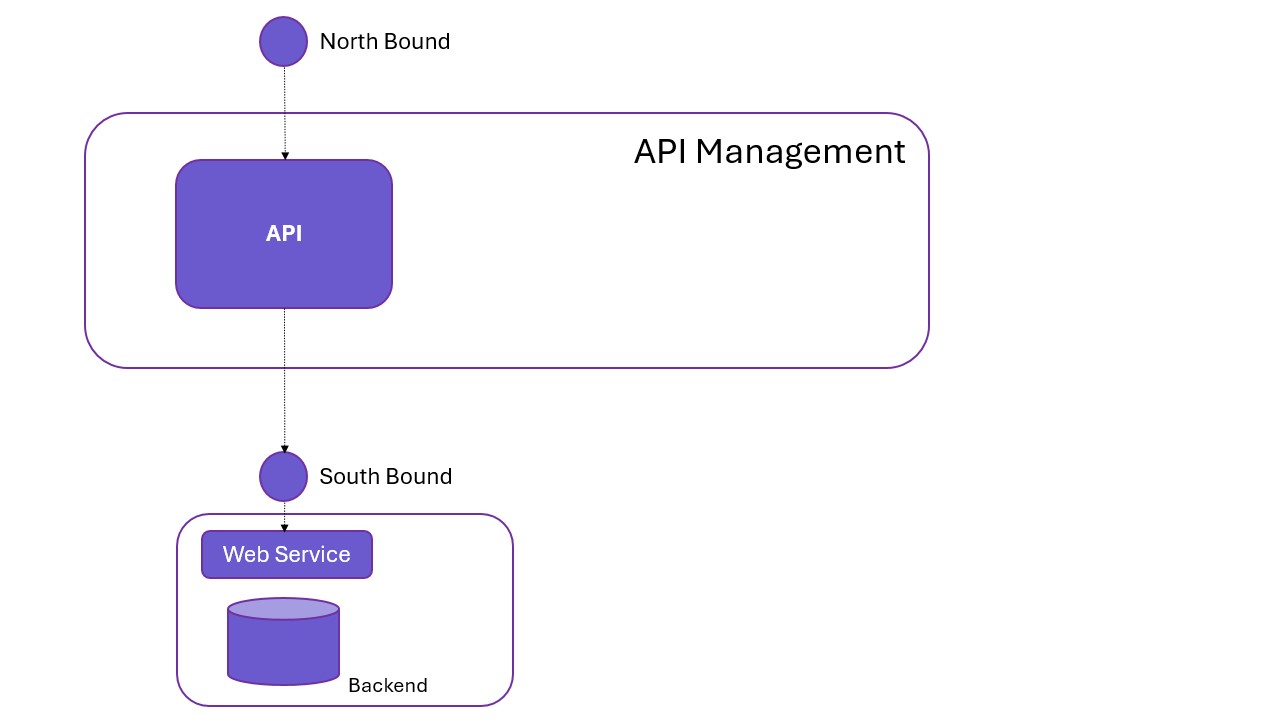
Figure 2. The API in a context.
For more information on REST, refer to: Fielding, Roy Thomas (2000). Chapter 5: Representational State Transfer (REST).
Terminology
Some terms used in this document can have different meanings to different people. For clarification, we provide definitions for the following terms:
- End-user: End-users do not consume APIs directly. Instead, they access APIs through client applications or websites. For example, a user checking the weather via a weather app receives data from an API used by the app.
- Client: An application or browser that accesses the API. It sends requests and receives responses from the API proxy, serving an end-user.
- API Consumer: Developers or partners who integrate APIs into mobile apps or websites for end-users. API consumers use the developer portal to register apps and access API products in Google Apigee.
Expectations from a good API consumer
-
Must: Respect standard conventions.
-
Should: Ignore unrecognised fields in responses.
-
Should: Be as specific as possible when consuming versions.
-
Should: Expect the API to be stateless.
-
Should: Utilize resource links provided in response payloads instead of self-generated URIs.
-
Could: Request additional data or functionality, particularly for widely used API standards or missing data.
-
Shouldn’t: Expect drastic API changes solely for individual needs, as other consumers may be affected.
-
API Customer: Entities that pay for commercial API usage and determine which APIs to use.
-
Developer Portal: A platform maintained by API providers to engage with API customers and consumers, offering API trials, documentation, and credentials.
-
API Provider: Also referred to as API developers, they create and manage APIs, making them available via API management platforms. They typically use a developer portal to provide API documentation to consumers.
HTTP verbs
HTTP verbs are a set of methods that can be used to perform actions on a specified resource (URI). You send them along with the request to tell the server what you want to do.
Most HTTP verbs correspond to CRUD operations. Some HTTP verbs allow you to send a body along with your request. The body contains extra information that might be required to perform a certain action. A POST request, for instance, contains a body that gives the server information on what entity to create.
Most common HTTP verbs
| HTTP Verb | CRUD | Description | Request Body? |
|---|---|---|---|
| GET | Read | Should only retrieve data from the resource. | No |
| POST | Create | Submit an entity. | Yes |
| POST | Action | Trigger an action. | No |
| PUT | Modify | Use PUT if you want to update all fields (because all fields must be provided, and those not provided get nulled). | Yes |
| PATCH | Modify | Use PATCH if you want to partially update some fields (all fields not provided remain as they are). | Yes |
| DELETE | Delete | Deletes the specified resource. | Optional |
| OPTIONS | - | Used to request the possible communication options. | Optional |
The HTTP verbs we use are GET, POST, PUT, PATCH, DELETE, and OPTIONS. API calls made from the browser often first send an OPTIONS call to the API. The API responds with the possible communication options, such as the supported HTTP verbs, headers, etc. Therefore, we make our APIs support OPTIONS calls.
For more on the HTTP verb OPTIONS, please refer to: Mozilla Developer Docs.
For more information on how to support OPTIONS calls and CORS, see the Cookbook.
Guideline: Don’t use an HTTP verb to perform an action that does not correspond to the verb. For instance, don’t use a POST request to only retrieve (GET) data.
Post vs Patch example
To create an operation to expire a customer, it is possible to create an endpoint expire and call it with the POST verb:
POST /v1/customers/{id}/expire
However, this could be confused with creating an expiration resource for a customer. For this use case, a PATCH request to update the expire property of a customer is suggested:
PATCH /v1/customers/{id}
{
    "data": {
        "expire": "true"
    }
}
It is important to consider if the operation is significant enough to own a resource (using POST) or if it is just a toggle or metadata property that can be set using PATCH.
5.2 Put vs Patch example
To update a resource, either update the full record (PUT) or update it partially (PATCH).
If all fields need updating, use PUT:
PUT /v1/customers/{id}
{
    "name": "ACME studio",
    "postalcode": "12345",
    "street": "Studio street",
    ...
    "houseNumber": "1-7"
}
If only one field needs updating, use PATCH:
PATCH /customers/v1/{id}
{
    "name": "ACME studio"
}
Query parameters
Query parameters are predefined parameters attached to a URL’s end. They define specific content or actions based on passed data. To append query parameters, use ?. To add multiple parameters, use &.
Example:
https://api.wpp.net/v1/orders?name=Branch&products=[Labels,Returns]
Purpose:
- Limit the number of results or fields returned.
- Sort the returned results.
Expected behaviour:
- Query parameters are optional.
- Use lowercase and
-to separate words (e.g.,order-id). - If a parameter is incorrect or unimplemented, it is ignored.
- Multiple parameters are treated as a logical
AND. - Escaped comma-separated values are treated as
OR. - If no records are found, the API returns
200 OKwith an empty array. - Incorrect values can result in
400 BAD REQUEST.
Filtering, paging, limit, etc.
APIs that support filtering, paging, or other operations should use these query parameters. All are optional and must be documented in the OpenAPI specification.
| Parameter | Type | Description |
|---|---|---|
| search | string | Search multiple fields. Describe if it’s startsWith, endsWith, contains, or allows wildcards (*). Define the fields the search applies to. |
| limit | integer | Defines the number of instances returned per page. Must be >0. Example: /resource-api?limit=20. |
| offset | integer | Defines the starting position in the results. Default is 0. Example: /resource-api?limit=10&offset=40. |
| fields | string | Select specific fields. Example: fields=orderNumber,orderDate,orderLines(lineNumber,articleNumber),customAttributes(color,favoriteSeason). |
| sort | string | Sort fields by name. Example: /customers?sort=firstName,lastName,-age (orders by firstName, then lastName ascending, and age descending). |
Logical expressions in query parameters
If supported, logical expressions help refine search queries.
| Expression | Example | Description |
|---|---|---|
| gt | /customers?chdttm-gt=2020-07-22 | Returns customers where chdttm > 2020-07-22. |
| gte | /customers?chdttm-gte=2020-07-22 | Returns customers where chdttm ≥ 2020-07-22. |
| lt | /customers?chdttm-lt=2020-07-22 | Returns customers where chdttm < 2020-07-22. |
| lte | /customers?chdttm-lte=2020-07-22 | Returns customers where chdttm ≤ 2020-07-22. |
Field selection
When an API has many fields and performance is affected, field selection can optimise queries.
Example:
/orders?fields=orderNumber,orderDate,orderLines(lineNumber,articleNumber),customAttributes(color,favoriteSeason)
Example response:
{
  "data": [
    {
      "orderId": "123-456",
      "orderDate": "date value",
      "orderLines": [
        {
          "lineNumber": 1,
          "articleNumber": "Art123"
        },
        {
          "lineNumber": 2,
          "articleNumber": "Art456"
        }
      ],
      "customAttributes": {
        "color": "yellow",
        "favoriteSeason": "summer"
      }
    }
  ]
}
HTTP headers
Content-Type vs Accept
The client should always send an Accept header, which indicates the preferred Content-Type format for the response. When including a request body, the client must also send a Content-Type header to specify the format of the data being sent. The server should always return a Content-Type header in its response. For REST APIs, the standard media type for JSON is application/json.
Custom content types are not allowed.
API key
The client must always include an API key, issued by the API management platform, in the Apikey HTTP header.
Do not send API keys in the URL or as query parameters, as this poses a security risk. The API key identifies the client (app) and should only be used by the application it was created for. API keys can be found in the developer portal under the respective developer app.
To ensure security:
- API keys should not be shared via email or included in Postman collections.
- If sharing is necessary, use the same secure methods as for passwords.
Authentication
Most APIs require user authentication. Clients must authenticate by providing credentials and requesting a token from the Token API (v1/oauth/token).
The acquired access token is used to authenticate requests to other APIs. The access token must be included in the Authorization header as follows:
Authorization: Bearer {access_token}
CORS
APIs that are accessible from browsers must support Cross-Origin Resource Sharing (CORS) by returning appropriate CORS headers.
Custom headers
Previously, custom headers were prefixed with X-, such as X-Custom-Header. However, this convention was deprecated in 2012 (see RFC 6648).
Convention: Use meaningful names without the X- prefix.
Example(s):
Powered-By: Apikey
HTTP status codes
Handling errors properly is crucial in API design. APIs should use standard HTTP status codes and provide clear error messages.
Overview of HTTP status codes
| Status Code | Status | Description | Set by Gateway | Set by Backend |
|---|---|---|---|---|
| 2xx Success | ||||
200 OK | Success | The API call was successful. | No | Yes |
201 Created | Success | A new entity was successfully created. | No | Yes |
202 Accepted | Success | The request was accepted but has not yet been processed. | No | Yes |
204 No Content | Success | The request was successful, but no content is returned. | No | Yes |
| 4xx Client Error | ||||
400 Bad Request | Error | The request could not be processed due to a client error. | Yes | Yes |
401 Unauthorized | Error | Invalid API key or authentication token. | Yes | Yes |
403 Forbidden | Error | The client does not have permission to access the resource. | Yes | Yes |
404 Not Found | Error | The requested resource does not exist. | Yes | Yes |
405 Method Not Allowed | Error | The HTTP method used is not supported for this endpoint. | Yes | Yes |
415 Unsupported Media Type | Error | The Content-Type header is incorrect. | Yes | Yes |
429 Too Many Requests | Error | The request quota was exceeded (rate limiting). | Yes | No |
| 5xx Server Error | ||||
500 Internal Server Error | Error | An unexpected backend failure occurred. | No | Yes |
502 Bad Gateway | Error | The backend received an invalid response. | Yes | Yes |
503 Service Unavailable | Error | The backend is temporarily unavailable. A retry may be required. | No | Yes |
504 Gateway Timeout | Error | The backend did not respond within the required timeframe. | Yes | Yes |
Error messages
APIs should return clear and descriptive error messages in JSON format when an error occurs.
Convention: Return error messages in JSON format.
Example (401 Unauthorised)
{
    "errors": [
        {
            "errorCode": "xyz",
            "errorMessage": "Sorry, this is not working",
            "correlationId": "12sdfkjsdkjjsdf",
            "link": "https://developer.wpp.com/api/ambee/errorcodes/xyz"
        }
    ]
}
Do not return stack traces, as they may contain sensitive information.
Example scenarios
GET request identifying a set of resources
GET /v1/senders?first_name=Peter&last_name=Brown
Response (200 OK)
{
    "data": [
        {
            "id": "1",
            "firstName": "Peter",
            "lastName": "Brown",
            "city": "London"
        },
        {
            "id": "2",
            "firstName": "Peter",
            "lastName": "Brown",
            "city": "New York"
        }
    ]
}
Response (Empty List, 200 OK)
{
    "data": []
}
Response (400 Bad Request)
{
    "errors": [
        {
            "status_code": 400,
            "detail": "'id' value is not a number"
        }
    ]
}
API specification
All APIs should have an OpenAPI 3.0 specification available. The specification should be accessible either:
- Through an API request (
GET /swagger.json) - Published on the developer portal
Convention: Swagger documentation must be available via the developer portal and/or an API request.
Example:
https://api.wpp.com/customers/v1/swagger.json
API testing
For every API, a Postman collection should be available. This collection must include:
- Tests for all happy path flows
- Tests for authentication and API key security
- Tests for invalid HTTP methods
- A call to check Swagger documentation (if applicable)
Each environment (Dev, Test, Acc, Prod) should have a corresponding Postman environment with test API keys.
Convention: api-name + 'Test Cases'
Example(s):
wpp-addresses-v1 Test Caseswpp-customers-v2 Test Cases
API logging
All API calls should be logged, capturing request/response parameters and bodies. Errors (4xx, 5xx) should include the response body.
| Logging | Request | Response |
|---|---|---|
| Headers | Always | Always |
| Status Code | Always | Always |
| Body | Always | Only for errors |
API environments
Production
Handles live requests. Requires approval for integration.
Sandbox
Simulates production with non-live/mock data. No approval required.
QAS/Staging/Acceptance
Used internally by the development team for validation before deployment.
UAT/Test
Used for testing implementation or design ideas. Requires approval for access.