Naming conventions
Companies usually don’t have just one API; they may have over 100 APIs. They may also have multiple versions of one API. This requires naming conventions and logical structuring.
Systems and versions are used in multiple naming conventions mentioned below. To prevent duplication, we provide some examples here. The ‘object’ used in most conventions can be substituted for ‘resource’.
Examples:
| Systems | Version |
|---|---|
| ERP | v1 |
| CRM | v2 |
Our conventions are loosely based on the JSON specification described on JSON API. This API conventions document mentions some highlights and additional details.
URLs
A logical structuring of the URLs of the APIs helps to organise and control the collection. An API is identified by its URL. Within WPP, the following convention is set up:
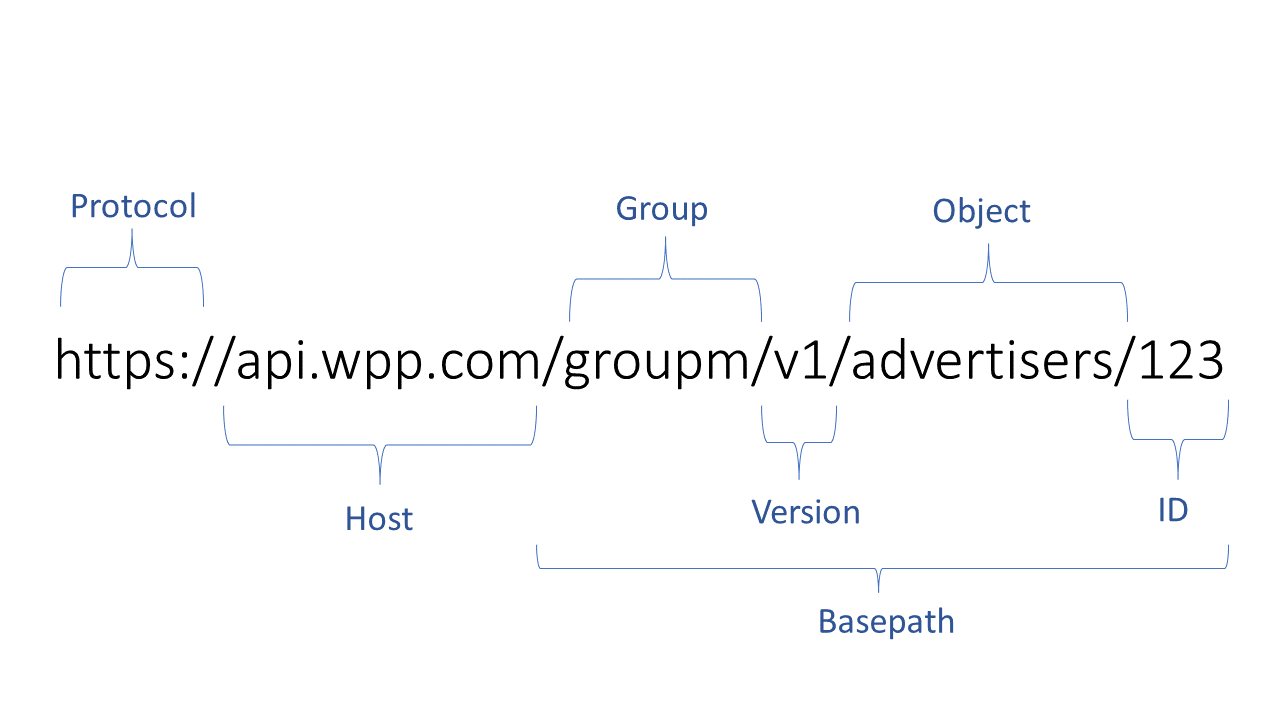
Structure of the URL
If possible, try to avoid using verbs. However, sometimes an API is not targeting an object but the rules that are applied to an object. For instance, validating an order before submission. In this case, the object is followed by an action.
Try to avoid trailing slashes at the end of the URL. The result with and without a trailing slash should be the same. URLs and query parameters are always lowercase. Objects must always be plural when a response can contain more than one instance. Use a minus (-) to separate words (e.g., orders-validation). Additionally, aim to always use lowercase to prevent OS discrepancies.
Convention: Use lowercase and minus (-) to separate words and use plural objects.
Example:
- Wrong:
https://api.wpp.com/v1/getOrder(uses an action verb and uppercase) - Correct:
https://api.wpp.com/v1/orders(this returns multiple orders with GET) - Correct:
https://api.wpp.com/v1/contract-terminations(uses a minus between words)
Host
The host identifies the server or environment. For more information on API Gateway environments, see Chapter 12. The current situation is as follows:
| Environment | Host |
|---|---|
| Dev | api-dev.wpp.com |
| Test | api-test.wpp.com |
| Int | api-int.wpp.com |
| Prod | api.wpp.com |
Base path
After the host follows the base path. The API listens to this base path. A base path, therefore, needs to be unique. Normally, the purpose of the API is to provide information about a certain object or update/create information about an object (the resource). Those objects form the path.
Keep in mind that users of your API don’t speak the language of your company, so objects must refer to commonly known entities. Objects are usually represented by nouns.
If multiple addresses/customers exist within a company from different backends, it must first be decided which address is the ‘real’ address (see API Dictionary). In case there are different types of addresses, define what type of address it is. For instance, v1/delivery/addresses.
Convention: protocol + host + group + version + (id) + (object / action)
Example(s):
https://api.wpp.com/mentions/v1/sourceshttps://api.wpp.com/climate/v1/weather
Internal APIs
For internal APIs, we add the label internal to enhance visibility that it is a different type of API. If the object in the base path is used across multiple business domains with different needs, it may be necessary to add a group as part of the base path.
Convention: protocol + host + ‘internal’ + group (optional) + version + object (optional)
Example(s):
https://api.wpp.com/internal/sales/v1/customers
Partner APIs
For Partner APIs, we use the same structure as public APIs.
Convention: protocol + host + group + version + (id) + (object / action)
Example(s):
https://api.wpp.com/mentions/v1/sourceshttps://api.wpp.com/climate/v1/weather
Path and query parameters
When fetching an object by ID, the parameter should be in the path.
Convention: IDs are in the path.
Example(s):
https://api.wpp.com/v1/customers/123
When searching through a list of objects, the parameters should be in the query.
Convention: Search parameters are in the query.
Example(s):
https://api.wpp.com/climate/v1/weather/by-lat-lng?lat=13&lng=54
The parameters should use logical and common base types:
| Base Type | Description |
|---|---|
| Numeric | When the value is numeric, the decimal marker should be a point since the naming language is (US) English, e.g., 1000.50. |
| Timestamps | Must use the ISO 8601 standard. Recommended formats: YYYY-MM-DDTHH:MM:SS (without timezone) or YYYY-MM-DDTHH:MM:SSZ (UTC). |
| Currency Codes | Must use the ISO 4217 format (e.g., USD for the United States Dollar, EUR for Euro). |
| Country Codes | Must use the ISO 3166-1 alpha-2 format (e.g., US for the United States, NL for the Netherlands). |
| Boolean | Accepts true or false. |
| String | For all other values. |
For more information about query parameters, see Chapter 6.
API versioning
Every API should have a major version in the name and URL to help identify the API.
Convention: Only use major versions, starting at v1. Versions are used in the API name and path.
Examples:
customers-v1andcustomers-v2customers-v1listens to:wpp/v1/customers/123customers-v2listens to:wpp/v2/customers/123
A new API is created for every new major version. Multiple versions of an API can exist together. Even though there is a new version of the API, older versions may still be supported for customers not ready to upgrade. Consumers of an older version should be informed about deprecation and migration to the new API.
Convention: Create a new API endpoint and update the version when a major change occurs.
Examples:
- MAJOR version increments when an incompatible API change is introduced, such as a data-type change (if already in production) or an attribute-name change (if already in production).
- NOT-MAJOR version changes occur when new backwards-compatible functionality is added, such as a new endpoint, query parameter, extended input/output fields, new operation, enum changes, or additional response codes. Changes in the development phase, such as modifying a data-type or descriptive text, also fall under this category.
JSON
For case sensitivity, multiple standards exist. Within WPP, we use lowerCamelCase. Every object and property within a JSON body must adhere to this convention. Avoid names that could confuse like context, API, resource, and object.
JSON bodies can contain arrays and objects. The naming of arrays is always plural since they can contain multiple items. The top level of the request or response should always be an object, not an array. This object should contain an object called data when calling a resource with an ID; otherwise, it should be an array called data. This structure allows for easier future extensions.
Convention: Use lowerCamelCase for JSON objects and properties.
Examples:
GET /customers/v1
{
    "data": [
        {
            "name": "Json",
            "customerNumber": 12345,
            "customerGroups": ["internal"]
        },
        {"name": "et cetera"}
    ]
}
GET /customers/v1/12345
{
    "data": {
        "name": "Json",
        "customerNumber": 12345,
        "customerGroups": ["internal"]
    }
}
| API type | Public | Partner | Internal |
|---|---|---|---|
| Guideling | Must | Should | Could |
API management specific naming conventions
Apigee naming conventions
Generic conventions for APIs are described in the API convention document. However, there are also conventions for objects like policies and flows in Apigee. These conventions are described in this chapter.
Proxies
All proxy names are exposed in the developer portal and should therefore have a meaningful name.
   Convention :   group + backend + resource + version
                   group + 'partner' + backend + resource + version

    Example(s) :    mediacom-brand-reporting-v1,
                    CTO-partner-ambee-weather-v1
API policies
All policy names in Apigee are written in lowerCamelCase and are preceded by an abbreviation of the policy type.
'Normal' policies:

    Convention: 	policy type + _ + lowerCamelCaseName

    Example(s): 	ML_messageLogging,
                    VAK_verifyApikey,
                    Q_imposeQuota

Shared flow or service callout policies:

    Conventions: 	policy type + _ + (sharedFlow/ request verb) +
                    object of flow (in lowerCamelCase)

    Example(s): 	FC_sharedFlowPreflow,
                    SC_POSTGenerateToken
This applies to both the DisplayName and the name of the policy.
| API Type | Requirement |
|---|---|
| Internal | Must |
| Private | Must |
| Partner | Must |
| Public | Must |
Shared flows and flow hooks
Create a shared flow whenever there is a group of policies that needs to be used in multiple APIs. There are two types of flows:
- General Shared Flows: Should be used in every API (with few exceptions).
- Specific Shared Flows: Only applied in certain use cases, such as all APIs with a particular backend.
With a flow hook, you attach a shared flow so that it executes at the same place for all API proxies deployed to a specific environment.
General shared flows
Convention: Shared + (verb) + object / flow + version
Example(s):
Shared_preFlow-v1Shared_loggingResponseTimes-v1
Specific shared flows
Convention: System + (verb) + object / flow + version
Example(s):
BE1_authorizationHeaders-v1BE2_removePathsuffix-v1
Flowhooks
Convention: Flowhook + (verb) + object / flow + version
Example(s):
BE1_authorizationHeaders-v1BE2_removePathsuffix-v1
Products
Products contain one or more APIs. Product names are exposed in the developer portal and should therefore not contain any information about the backend. A simple format is used:
- The Addresses-10000 product could contain, for instance, four API paths (create, update, get, and delete -address API).
- The quota specified on this product is 10000.
- If there are different types of addresses (e.g., delivery address, customer address), specify them in the product name (e.g.,
DeliveryAddresses-5000).
When describing a product, if it is meant for a specific group of customers, mention it. If the group is diverse, leave it out. Also, specify the purpose of the product (e.g., "Search for Dutch addresses" or "CRUD functions for customers").
Convention: subject / process (plural) + quota
Example(s):
Addresses-5000Customers-1000Labels-10000DeliveryAddresses-5000
API Type Requirements
| API Type | Requirement |
|---|---|
| Internal | Must |
| Private | Must |
| Partner | Must |
| Public | Must |
Specification
When publishing a product in the developer portal, you make a snapshot of the specification of said product. To not overcomplicate things, the specification that will be published in the portal needs to carry the same name as the product it belongs to.
It is also possible to create a specification for an API and then generate the API from the specification. In that case, you can give the specification the name of the API. When you want to publish the product, there are two possibilities:
- The API is part of a bigger product containing more APIs. Create the specification for this product, don’t forget to specify the base path as
/, and give it the same name as the product. - The API has a one-on-one relationship with the product. Rename/re-upload the specification with the name of the product.
When developers register through the developer portal, they can create their own developer app. They can give their developer app any name they want. We cannot control this. Because of this, we won’t set up a naming convention for the developer app. Ideally, though, the developer will create a new developer app for every new consuming application, and the name contains the name of the consuming application.
Developer application
When developers register through the developer portal, they can create their own developer app. They can give their developer app any name they want. We cannot control this. Because of this, we won’t set up a naming convention for the developer app. Ideally, though, the developer will create a new developer app for every new consuming application, and the name contains the name of the consuming application.
Test application
There is one exception to this rule. For testing purposes, it is necessary to create a test product that has access to all (or a specified group) of APIs. For this, we set up the following convention:
Convention: Test party + TEST (all uppercase)
Example(s):
AT-TEST(stands for WPP test)
For the production environment, we will also create an AT-PRTG application. This application will be used exclusively for monitoring with PRTG.
Target Servers
We also tried to keep this naming convention as simple as possible. Ideally, every backend has one target server. The configurations can differ per environment, but the name stays the same. The backend certificates (if required) have to be imported for each environment. It might happen that you only expose a certain part or endpoint of a backend. You can use an extension to give more specific info on which part.
Convention: System + (extension)
Example(s):
ERP,CRM_addresses
Key-value maps
Key-value maps may have different functions. This makes it hard to set up a generic naming convention. They can, for instance, be used to save a username and password that can be used in an API to set an authorisation header for the backend. Regarding this example, we have set up the following naming convention:
Convention: System + key name
Example(s):
ERP_username,CRM_password