Version 3.0.0
Welcome to the WPP Open Design System v.3.0.0! This release introduces updates and bug fixes to our components library. Read on to learn more!
Resources
You can download icons, foundations, and components from the Open Design System v.3.0.0.


New component: More button
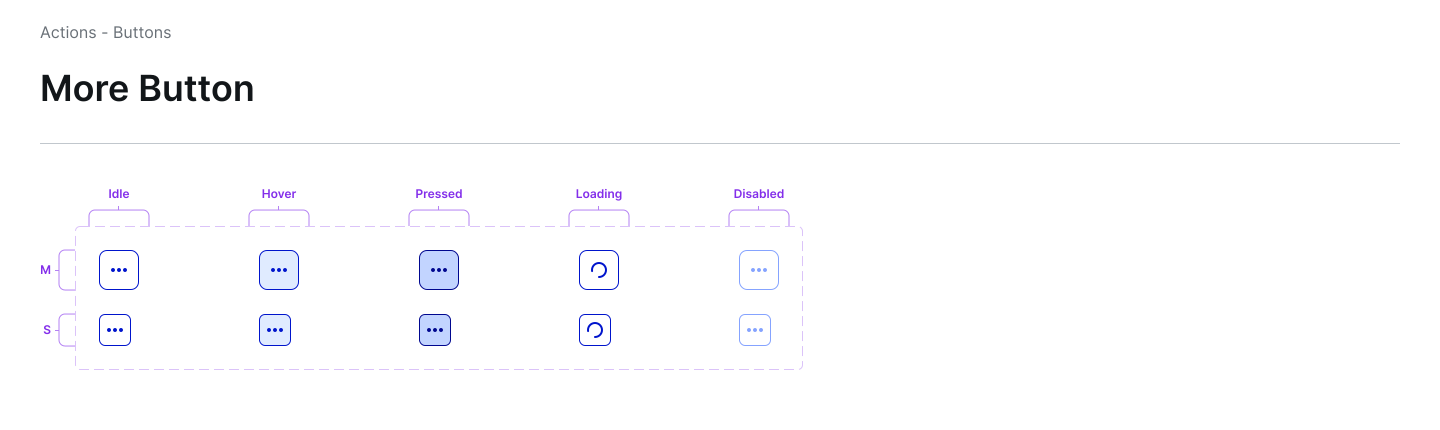
Introducing the More button, a new component to reveal additional options or actions that don’t fit within the primary interface.
Breaking changes
- Select:
-
Changed the way
wpp-list-itemsare passed into this component. -
The component now accepts a list of
ListItemInterfaceobjects.
-
Find more information under the Notes section in the Select component Storybook.
 View in Storybook
Updates and improvements
Development specific
-
- Added support for
valueproperty in the WppChatInput component to allow users to control its value programmatically. - Introduced the following two interactions in the Chat input:
- When the chat input component is focused, pressing the “Enter” key sends the message.
- Pressing
Shift + Enterinserts a new line.
- Added support for
-
Full screen modal: Updated max-width of full-screen modal to 95%, focusing on extending it as much as possible for complex full-screen modals.
-
Search: Updated placeholder text in the Search component to
Search. -
Tooltip: Simplified the tooltip configuration structure in Storybook, implementing the following changes:
- Merged Text and Title/Text options under a unified property.
- Removed the placement option.
- Warning and Error states can now be set directly as properties on Text/Title.
- Combined custom content and multiline support.
-
Load more: Merged infinite scroll with load more button to prioritize this combination over pagination.
-
Popover: Added the
withSearchproperty to the Popover component, which offers integrated search functionality. -
Tag: Updated the opacity of disabled tags to
40%in the Tree component. -
Banner: Updated the info-icon in the Banner component.
-
Icon: Introduced an icon named Experiment.
Figma libraries
- More button: Introduced a new WppMoreButton component to the design systems library.
- Full screen modal: Updated max-width of full-screen modal to
90%, focusing on extending it as much as possible for complex full-screen modals. - Tag:
- Removed the opacity on the tag component.
- Added wrapping support for tags—now tags can automatically wrap to the next line when space is limited.
- Popover: Created a popover component with search functionality.
- Tooltip:
- Added documentation for the Tooltip component.
- Added examples in the Tooltip storybook including examples for
TooltipWithAllowHTML.
- Data visualization: Added support to toggle X/Y axis guides and horizontal/vertical guides.
- OS Bar: Removed the
WPPfrom the OS bar. - DS: Updated the table element for the disabled state.
- Icon:
- Renamed the icon
Moreto “Action” in the Figma design. - Introduced an icon named Experiment.
- Renamed the icon
Bug fixes
Development specific
- Segmented control: Corrected an issue with segmented control where a border appears intermittently above or below the component when zooming into the page.
- Autocomplete: Resolved an issue with the autocomplete component—now the dropdown menu aligns properly when a user scrolls the page, and it doesn’t overlap with the header component.
- Achieved WCAG AA compliance level for the following components:
- Button
- Banner
- Avatar
- BackToTopButton
- Popover
- Filter button
- Sortbutton
- More button
- Action button